
Is It Time to Redesign Your Website? 5 Signs to Look For
Is It Time to Redesign Your Website? 5 Signs to Look For
Your website is often the first impression potential customers have of your business. If it looks outdated, loads slowly, performs poorly on mobile devices, or fails to generate leads, it could be costing you valuable opportunities. A strategic website redesign can improve user experience, strengthen your brand, increase search visibility, and turn more visitors into customers.
1. Your Website Looks Outdated
An outdated website can weaken your brand's credibility before visitors even explore your products or services. When the design feels old-fashioned, the layout is confusing, or the content no longer reflects your business, potential customers may question whether your company is keeping up with their expectations.
Website design trends, user expectations, and digital technologies change over time. A design that worked several years ago might no longer communicate your brand effectively or provide the smooth browsing experience customers expect today.
What are the warning signs of an outdated website?
- Old-fashioned layouts: Your website uses cluttered pages, inconsistent spacing, or visual elements that make it difficult to find information.
- Inconsistent branding: Fonts, colors, imagery, and messaging differ across pages or no longer match your current brand identity.
- Low-quality visuals: Blurry images, outdated stock photographs, or poorly designed graphics make your business appear less professional.
- Difficult navigation: Visitors struggle to locate services, pricing information, contact details, or important pages.
- Outdated content: Your website displays old offers, discontinued services, expired announcements, or information that no longer reflects your business.
How can a website redesign solve these problems?
A professional redesign aligns your website with your current business goals, audience expectations, and brand identity. The objective is not simply to make the website look attractive; it is to create a clear, consistent experience that helps visitors understand your value and take the next step.
A redesign may include:
- A modern, professional visual identity and consistent design system.
- Clear service pages with compelling headlines and benefit-focused messaging.
- Improved page layouts, typography, spacing, and imagery.
- Intuitive navigation that helps visitors find relevant information quickly.
- Strategically placed calls to action that encourage enquiries and purchases.
Practical tip: Review your website from the perspective of a first-time visitor. Ask whether the homepage immediately explains what you do, whom you help, and why someone should choose your business.
2. Your Website Is Not Mobile-Friendly
If visitors have to zoom in, scroll sideways, struggle with buttons, or navigate broken layouts on their phones, your website needs attention. A mobile-friendly website makes it easy for people to read your content, explore your services, and contact your business regardless of the device they use.
Customers browse websites on smartphones and tablets throughout the day. Search engines also primarily use the mobile version of a website's content for indexing. A poor mobile experience can therefore affect usability and may contribute to weaker search performance, depending on the underlying issues.
How to recognize mobile usability problems
- Text is too small or difficult to read without zooming.
- Buttons and links are too close together or difficult to tap.
- Images extend beyond the screen or appear distorted.
- Menus are difficult to open, navigate, or close.
- Forms are frustrating to complete on smaller screens.
- Important content or calls to action disappear on mobile devices.
- Pop-ups cover the page and prevent visitors from accessing information.
What does a mobile-friendly redesign involve?
A responsive website automatically adapts its layout to different screen sizes. However, effective mobile design involves more than shrinking desktop elements to fit a smaller display.
Your redesigned website should prioritize:
- Responsive layouts: Content should remain readable and visually organized on phones, tablets, laptops, and desktops.
- Touch-friendly controls: Buttons, navigation elements, and form fields should be easy to use with a finger.
- Readable content: Use appropriate font sizes, line spacing, and paragraph lengths.
- Simple navigation: Make important pages and contact options easy to reach.
- Mobile performance: Optimize images, scripts, and other resources to reduce unnecessary loading delays.
- Accessible interactions: Ensure forms, menus, and interactive components work with appropriate keyboard and assistive technology support.
Before launching a redesigned website, test it on real devices and across multiple screen sizes. A layout that looks excellent on a desktop monitor may still contain usability problems on a smartphone.
3. Your Website Loads Slowly
A slow website can frustrate visitors, interrupt the customer journey, and reduce the likelihood that people will explore your services. If pages take too long to display, interactive elements respond slowly, or users encounter loading errors, improving performance should be a priority before or during a redesign.
Website speed is influenced by several factors, including hosting quality, image sizes, code efficiency, third-party scripts, caching, and server response times. Rebuilding the design alone will not necessarily fix these problems; a successful redesign should include a technical performance assessment.
Common reasons websites become slow
- Oversized images: Large photographs and graphics increase the amount of data browsers must download.
- Excessive plugins: Unnecessary or poorly optimized WordPress plugins can introduce additional scripts and processing overhead.
- Unoptimized code: Inefficient JavaScript, CSS, and other resources can delay page rendering or interactions.
- Inadequate hosting: Limited server resources or slow database responses may affect page delivery.
- Too many third-party tools: Advertising scripts, chat widgets, tracking tools, and external integrations can increase loading time.
- Poor caching configuration: Missing or unsuitable caching can cause resources to be repeatedly generated or downloaded unnecessarily.
How can you improve website speed?
Start by measuring performance instead of guessing what is wrong. Tools such as Google PageSpeed Insights and Lighthouse can help identify issues affecting loading, responsiveness, and visual stability.
Depending on the findings, improvements may include:
- Compressing images and serving appropriately sized WebP or AVIF files where suitable.
- Implementing browser caching and suitable server-side caching.
- Reducing unnecessary plugins, scripts, and third-party requests.
- Optimizing CSS, JavaScript, and font delivery.
- Improving hosting configuration and database performance.
- Using a content delivery network when appropriate for the audience and website architecture.
- Reviewing Core Web Vitals, including Largest Contentful Paint, Interaction to Next Paint, and Cumulative Layout Shift.
For reference, Google's commonly recommended Core Web Vitals targets are an LCP of 2.5 seconds or less, an INP of 200 milliseconds or less, and a CLS score of 0.1 or less, assessed at the 75th percentile of page visits. These measurements help evaluate real-world loading, responsiveness, and visual stability.
A performance-focused redesign should establish baseline measurements and compare them with results after launch. This makes it easier to determine whether the changes have delivered measurable improvements.
4. Your Website Does Not Generate Enough Leads or Sales
If your website receives visitors but produces very few enquiries, bookings, or sales, its design and customer journey may not be supporting your business objectives. A successful website should do more than attract attention; it should guide visitors toward a clear and relevant next step.
Low conversions do not automatically mean your website needs a complete redesign. Your pricing, offer, traffic quality, competition, messaging, and sales process can all influence results. The first step is to identify where potential customers are losing interest or encountering obstacles.
Signs that your website is not converting effectively
- Visitors land on your homepage but do not explore service pages.
- Your website receives enquiries that are irrelevant or poorly qualified.
- Contact forms are abandoned or contain too many unnecessary fields.
- Visitors cannot easily understand your services, pricing approach, or benefits.
- Important calls to action are difficult to find or use vague wording.
- Your website lacks convincing testimonials, relevant case studies, or other trust signals.
- Analytics show substantial drop-offs on important landing pages or during checkout.
How can a redesign improve conversions?
A conversion-focused redesign makes the customer journey easier to understand and complete. It connects the information visitors need with the actions you want them to take, while reducing unnecessary friction.
Consider implementing the following improvements:
- Clear value propositions: Explain what your business does, who it serves, and what makes your offering relevant.
- Prominent calls to action: Use specific wording such as "Request a Quote," "Book a Consultation," or "Discuss Your Project."
- Better service pages: Explain the problems you solve, your process, expected deliverables, and the next steps.
- Trust-building content: Present genuine testimonials, verified reviews, relevant project examples, and accurate company credentials.
- Simpler forms: Ask only for the information needed to respond effectively to an enquiry.
- Consistent messaging: Ensure advertisements, search listings, landing pages, and calls to action set compatible expectations.
- Conversion tracking: Measure form submissions, qualified leads, purchases, calls, and other meaningful business outcomes.
Why analytics should guide your redesign
Website analytics can help identify which pages attract visitors, where people leave, and which sources generate valuable enquiries. Combining this information with customer feedback provides a stronger foundation for design decisions.
For example, if visitors frequently view your service pages but rarely submit enquiries, you might need clearer benefits, stronger trust signals, more visible contact options, or a simpler form. If visitors leave immediately because the page does not match their search intent, improving the content may be more important than changing the visual design.
The goal is to improve measurable outcomes rather than relying solely on whether the redesigned website looks attractive.
5. Your Website Is Struggling With SEO and Online Visibility
If potential customers cannot find your website through relevant search queries, your business may be missing opportunities to reach people who are already looking for your services. A website redesign can address technical and structural problems that hinder discoverability, provided SEO requirements are planned from the beginning.
Search visibility depends on many factors, including content relevance, technical accessibility, site structure, competition, authority, and user intent. A new design alone will not guarantee higher rankings. It should be part of a broader strategy that supports search engine optimization and a useful experience for visitors.
SEO warning signs to investigate
- Important service pages receive little or no organic search traffic.
- Search engines cannot properly crawl or index valuable pages.
- Your website has broken internal links, redirect chains, or unnecessary duplicate URLs.
- Page titles, meta descriptions, headings, or content are missing or poorly aligned with search intent.
- Your site structure makes important pages difficult for visitors and search engines to discover.
- Mobile usability or performance problems affect the browsing experience.
- Your content no longer reflects your services, expertise, or customers' questions.
How should SEO be incorporated into a website redesign?
SEO should be considered before the new design is built, not added as an afterthought. Changing page URLs, removing useful content, or introducing technical errors without a migration plan can damage existing organic visibility.
A structured SEO-focused redesign should include:
- SEO audits: Identify technical errors, indexation issues, content gaps, and existing opportunities.
- Keyword and intent research: Understand the queries your target audience uses and the information it expects to find.
- Content mapping: Preserve valuable pages and determine whether they need improvement, consolidation, or replacement.
- URL planning: Keep useful URLs where possible and implement appropriate permanent redirects when addresses must change.
- Internal linking: Create logical connections between service pages, supporting articles, case studies, and related resources.
- Technical SEO: Review canonical tags, XML sitemaps, robots directives, structured data, and indexability.
- Performance and accessibility: Build pages that load efficiently and are usable by a broad range of visitors.
- Post-launch monitoring: Check crawl errors, indexing, rankings, organic traffic, and conversions after deployment.
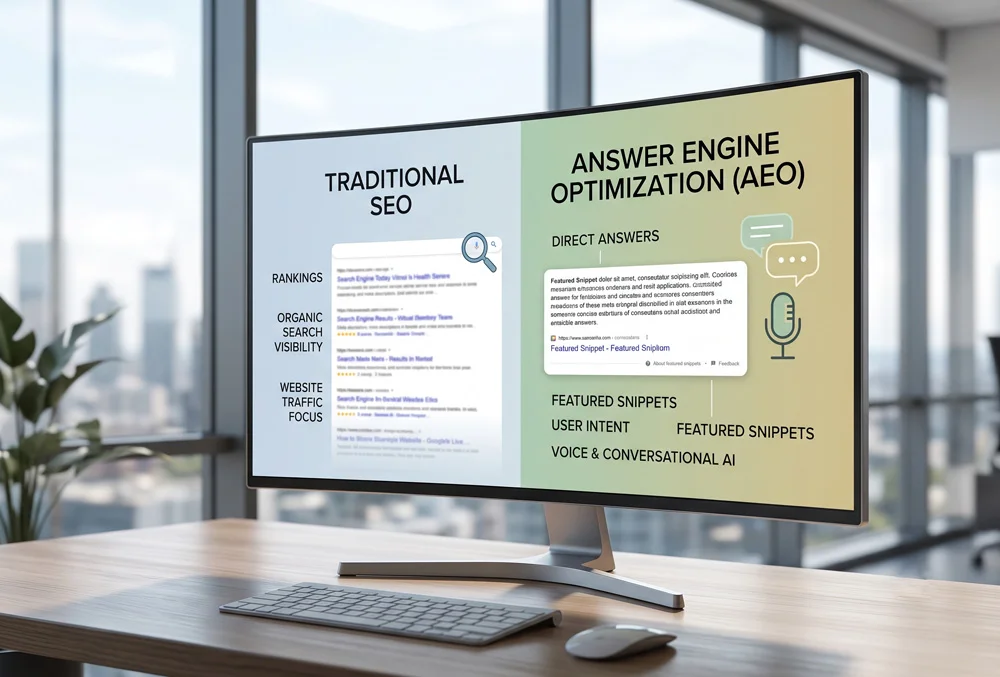
What role does Answer Engine Optimization (AEO) play?
Answer Engine Optimization focuses on making your content useful, understandable, and accessible to answer-oriented search experiences, including AI-powered search and question-answering systems. Although specific platforms use different methods to discover and present information, clear content and reliable technical foundations can support discoverability.
As part of an SEO and AEO strategy, consider:
- Answering relevant customer questions directly and accurately.
- Using descriptive headings and logical content organization.
- Providing original insights, practical explanations, and verifiable business information.
- Keeping service descriptions, company details, and author information consistent.
- Using appropriate structured data that accurately represents the visible page content.
- Maintaining technically accessible pages and useful internal links.
Neither SEO nor AEO can guarantee rankings, citations, or inclusion in AI-generated answers. However, a carefully planned website can provide a stronger foundation for both traditional search visibility and emerging discovery experiences.
Other Signs Your Website May Need Attention
Even if your website looks modern and functions reasonably well, changes in your business, technology, and customer expectations can reveal problems that deserve attention. The following warning signs may indicate that a redesign or targeted technical improvement is worthwhile.
- Your business has changed: You offer new services, serve different audiences, or have repositioned your brand, but the website still reflects your previous direction.
- Your content management system is limiting you: Updating pages requires unnecessary technical work, or your current platform cannot support important business requirements.
- Your website is difficult to maintain: Outdated plugins, unsupported software, recurring errors, or inconsistent page templates create operational challenges.
- Security concerns are increasing: Your website lacks appropriate maintenance, backups, access controls, or a reliable update process.
- Competitors communicate more effectively: Competing websites may offer clearer service information, stronger proof of expertise, or a simpler enquiry process.
- Accessibility needs are overlooked: Visitors encounter keyboard navigation issues, inadequate contrast, missing labels, or other usability barriers.
Not every issue requires rebuilding the entire website. A technical audit can help determine whether targeted improvements, a partial redesign, a platform upgrade, or a complete redevelopment is the most appropriate investment.
Website Redesign vs. Website Refresh: What Is the Difference?
A website refresh updates selected elements, while a redesign involves more substantial changes to the site's structure, user experience, functionality, or visual identity. Understanding the difference helps you choose a solution that addresses the actual problems without spending unnecessarily.
When is a website refresh enough?
A refresh may be suitable when your existing website is technically sound and its overall structure supports your goals, but some elements need improvement.
- Updating colors, typography, images, and visual styling.
- Improving headlines, service descriptions, and calls to action.
- Refreshing testimonials, portfolio examples, and case studies.
- Improving selected landing pages or contact forms.
- Correcting minor navigation or layout problems.
When is a complete website redesign more appropriate?
A more extensive redesign may be necessary when the current platform, architecture, user experience, or functionality prevents your business from meeting its objectives.
- Your website is not responsive or has persistent mobile usability problems.
- Its architecture makes content difficult to organize and maintain.
- Important integrations or business features cannot be implemented effectively.
- Technical debt and outdated components make improvements difficult.
- Your brand positioning and target audience have changed significantly.
- Major conversion, accessibility, performance, or security issues require coordinated changes.
The best approach depends on the severity of the problems, the condition of the existing website, your budget, and your business goals. A professional assessment can help establish priorities before work begins.
What Should You Expect From a Professional Website Redesign?
A successful redesign begins with clear objectives and a documented plan. Rather than starting with colors and layouts alone, the project should consider your audience, business model, technical requirements, content, search visibility, and the actions you want visitors to take.
Step 1: Discovery and website audit
The process starts with an assessment of your existing website, including its design, performance, SEO, content, functionality, analytics, and usability. This identifies what should be preserved, improved, or replaced.
Step 2: Strategy and planning
Define your target audience, key services, conversion goals, required features, content structure, and success measurements. Establishing these priorities helps keep design and development decisions aligned with business objectives.
Step 3: UX design and visual development
Create page layouts that organize information logically and make important actions easy to find. Visual design should reflect your brand while supporting readability, accessibility, and a consistent user experience across devices.
Step 4: Website development
Build the approved design using an appropriate platform and technology stack. Depending on your requirements, this may involve custom web development, WordPress development, custom themes, content management features, integrations, or specialized functionality.
Step 5: Content, SEO, and AEO implementation
Prepare useful content, optimize page metadata, implement internal links, review technical SEO, and add relevant structured data. If existing URLs change, prepare and test the redirect plan before launch.
Step 6: Quality assurance and testing
Test the website across devices and browsers. Review forms, navigation, integrations, accessibility, security, page speed, analytics, and essential business workflows before making the new site public.
Step 7: Launch and ongoing improvement
After launch, monitor website errors, indexing, traffic, conversions, and performance. Use real-world data to identify further improvements rather than treating the launch as the end of the project.
Before approving a redesign, agree on the project scope, responsibilities, content requirements, timelines, testing process, and post-launch maintenance arrangements. Clear expectations help reduce delays and avoid misunderstandings.
Frequently Asked Questions About Website Redesign
1. How often should a business redesign its website?
There is no universal redesign schedule. Some websites remain effective for many years with regular maintenance, while others require earlier changes because of evolving business goals, technology, or customer needs. Review your website periodically and use performance data, usability testing, and technical audits to decide when improvements are necessary.
2. How much does a website redesign cost?
The cost depends on the website's size, design complexity, platform, required functionality, content needs, integrations, and SEO requirements. A small refresh generally involves less work than a custom website redesign or complex WordPress redevelopment. Request a detailed proposal based on your specific requirements instead of comparing prices without considering project scope.
3. Will redesigning my website improve my Google rankings?
A redesign can address issues involving mobile usability, site structure, page performance, content organization, and technical SEO. However, a redesign does not automatically improve rankings. Poorly managed URL changes, deleted content, and technical mistakes can harm existing visibility. Protect valuable content and URLs, plan redirects, and monitor performance after launch.
4. Can I redesign my website without losing existing SEO traffic?
Although no process can guarantee that rankings and traffic will remain unchanged, careful planning can reduce avoidable risks. Audit your existing URLs, preserve useful content, implement appropriate redirects, check canonical tags and sitemaps, verify indexing settings, and monitor Google Search Console after launch.
5. Is WordPress a good choice for a redesigned business website?
WordPress can be a suitable option for many businesses because it offers flexible content management, a broad ecosystem of extensions, and customization opportunities. The right setup depends on your security requirements, performance expectations, maintenance resources, and functionality. A well-built WordPress website should use suitable hosting, carefully selected plugins, reliable backups, and regular updates.
6. How long does a website redesign take?
The timeline depends on the number of pages, design approvals, content preparation, integrations, custom functionality, and testing requirements. A relatively simple project may take a few weeks, while a larger or more complex website can take several months. A clear project plan helps establish realistic milestones.
7. Should I redesign my website or improve the existing one?
If the website's structure and technology are sound, targeted improvements may be sufficient. If fundamental issues affect responsiveness, usability, performance, maintenance, or business functionality, a broader redesign may provide a better long-term solution. An audit can help determine the most practical approach.
8. What is the difference between SEO and AEO?
Search Engine Optimization (SEO) focuses on improving a website's discoverability in traditional search engines and attracting relevant organic traffic. Answer Engine Optimization (AEO) focuses on making information useful and accessible to systems that provide direct answers, including AI-powered experiences. The approaches overlap in areas such as clear content, accurate information, technical accessibility, and structured organization.
9. What should I prepare before contacting a website redesign agency?
Prepare your current website URL, business objectives, target audience, important services, examples of websites you like, required features, budget range, and preferred timeline. If available, share analytics, existing SEO reports, brand guidelines, and examples of the problems you want to solve. This information helps an agency recommend a more relevant solution.
How We Can Help
If your website looks outdated, struggles on mobile devices, loads slowly, generates too few enquiries, or fails to support your search visibility goals, Web Clinic Online can help you identify the problems and plan a practical solution. Our approach combines design, development, and digital marketing to create websites that support real business objectives.
As a five-star web design and development agency with over 24 years of experience, Web Clinic Online helps businesses strengthen their online presence through customized digital solutions. We understand that every business has different audiences, challenges, budgets, and growth priorities.
Our website and digital marketing services
- Custom web design: Professional, brand-aligned website designs focused on usability, clarity, and customer engagement.
- WordPress development: Flexible, manageable WordPress websites tailored to your content and business requirements.
- Search Engine Optimization: Technical SEO, on-page optimization, content improvements, and strategies to support organic visibility.
- Answer Engine Optimization: Content and technical improvements designed to make business information more accessible to answer-oriented and AI-powered search experiences.
- Graphic design: Consistent visual assets for websites, landing pages, advertising campaigns, and brand communications.
- Video editing: Professional video content that helps communicate your services, demonstrate expertise, and engage your audience.
- Digital marketing: Coordinated strategies to support brand awareness, website traffic, lead generation, and business growth.
Let's evaluate your website's potential
You do not have to replace your entire website simply because a few elements are outdated. The first step is to understand what is working, what is holding your business back, and which improvements are most likely to support your goals.
Web Clinic Online can help you evaluate your current website and identify opportunities to improve its design, functionality, performance, SEO, and overall customer experience. Whether you need a focused refresh, a custom WordPress website, or a broader redesign supported by SEO and AEO, we can discuss an approach suited to your requirements.
Ready to take the next step? Contact Web Clinic Online to discuss your website and your business goals.
Contact Web Clinic Online to start the conversation about your website redesign project.
Is It Time to Redesign Your Website? 5 Signs to Look For Read More »